FAQs
How do I program Inputs 1 & 2 on an FWC-FSLC-EZM2 using the FireLink Cloud?
The FWC-FSLC-EZM2 Dual Input Monitor Module is an addressable SLC two-zone conventional input module providing two independent contact monitoring circuits while only utilizing one address on the SLC loop. Designed to be used with pull stations, water flow switches, and other applications requiring the monitoring of dry contact alarm initiating devices.
When mapping the FWC-FSLC-EZM2 two inputs using PCD-Windows Quickloader software, the second input MUST immediately follow the first input; the second input cannot be mapped without first mapping the first input.
To program an FWC-FSLC-EZM2 using the FireLink Cloud programming website (www.firelinkpro.com):
- Select Zone Assignments.

- Choose a location with two consecutive zones, for example:

- Set the zones appropriately (even if you are not using zone 2, program it in the second zone):

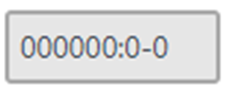
- Select within the RF/SLC PT field:
- Program the zone as follows:
-
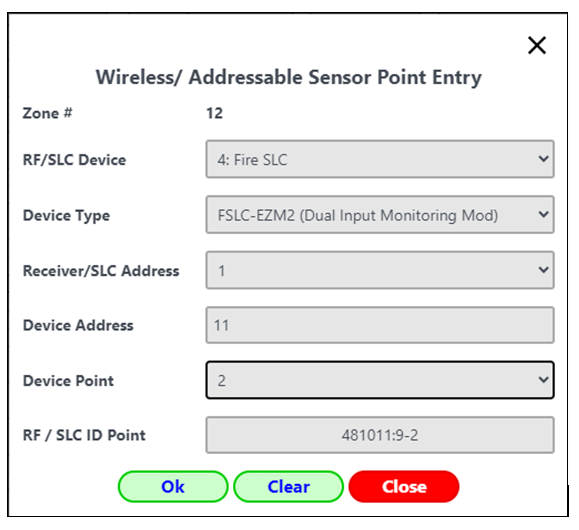
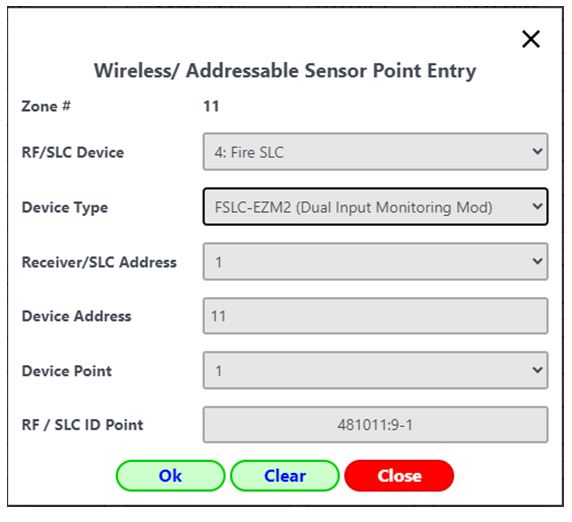
- RF/SLC Device: 4: Fire SLC
- Device Type: FSLC-EZM2
- Enter the SLC Address of the SLC PC board
- Device Address: The number programed in the EZM2
- Device Point: 1 for zone 1
- Program the second zone with the same attributes as Device Point 1 above, but enter Device Point "2":