
FAQs
How do I wire a tamper switch to the metal enclosure of my StarLink communicator and program the input?
Although each StarLink communicator housed in a metal enclosure is factory equipped with a tamper switch, the switch is non-operational by design; closing the enclosure door does not close the tamper switch. If your installation requires a tamper switch, use part "GEM-Tamperkit".
To wire the tamper switch to a StarLink input and program the input:
1. Wire the switch to N/O with the resistor in parallel.
2. In the NAPCO NOC website (NapcoNOC.com), open the Inputs/Outputs tab and program the StarLink IN 2 input zone Function as User Defined with an Event # of 341 (example shown below):

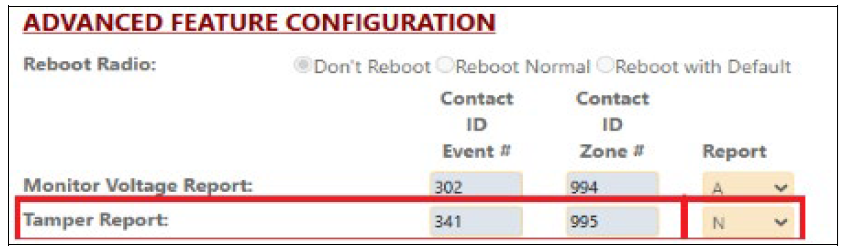
3. In the Advanced tab, disable the StarLink Tamper Report (as "N"):
If you require the GEM-TamperKit to trigger a zone in the control panel, wire the switch for N/O or N/C (refer to the Tamper Switch Mounting Instructions in the documentation provided with the StarLink communicator).