Skip to main navigation Skip to main content Skip to footer
Napco Technical Library Napco Technical Library
  • Home
  • Technical Library
    • NAPCO
    • Alarm Lock
    • Napco Access Pro
  • Software Downloads
    • NAPCO
    • Alarm Lock
    • Napco Access Pro
  • Training
    • NAPCO
    • Alarm Lock
    • Napco Access Pro
  • Social
  • Log In
  • |
  • Register
Home > FAQ > FAQ Answer

< Back to Support

FAQs By Category

  • Accessories
  • Air Access
  • ArchiTech
  • Credentials/Badge Formats/PIV
  • DL-Windows
  • Door Alarms
  • E-Access (Napco)
  • GEMC Commercial Platform
  • iLock
  • Keypads
  • Miscellaneous
  • MVP Access
  • Networx
  • Panic Exit Devices
  • Training Videos
  • Trilogy Accessories
  • Trilogy Locks
  • Trilogy Networx Gateways/ Wireless Locks (Continental)

FAQs


< Back to FAQs

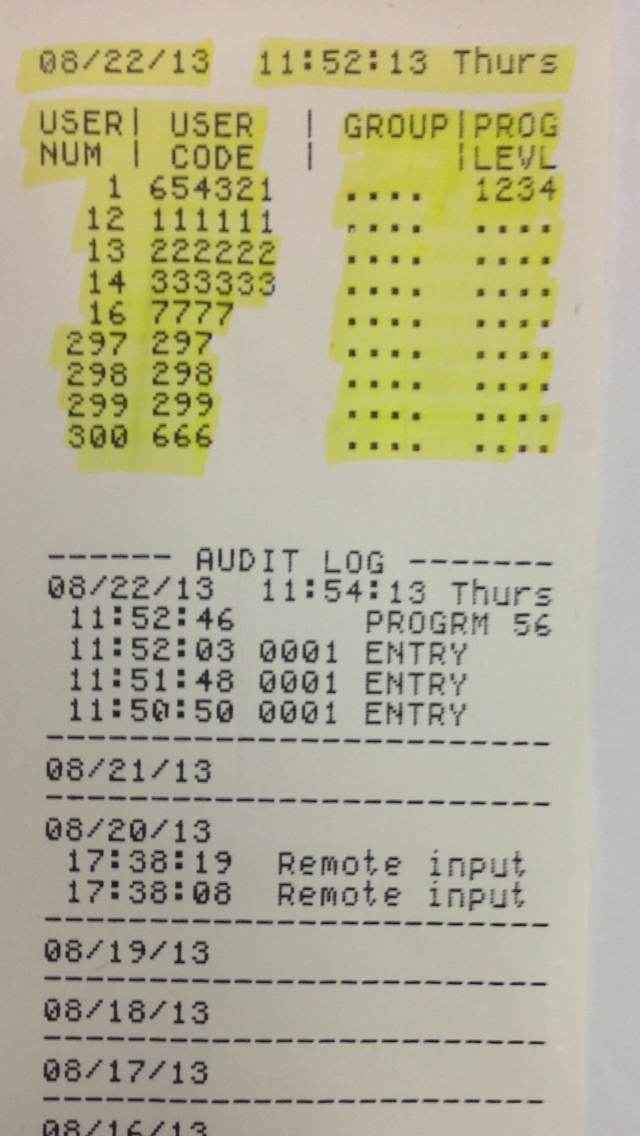
Can proximity card information for a user be printed in the audit trail?

Although User Codes can be printed, as shown in the sample image below, proximity card information cannot be printed in the audit trail.

Search FAQs

Search FAQs

Tags

DL-Windows DL3000 FireLink GEM-P1632 GEM-P1664 GEM-P3200 GEM-P816 GEM-P9600 GEM-X255 GEMC Gemini IBR-ZREMOTE Marks NOC PCD-Windows Prima Quickloader SLe-GSM StarLink StarLink Connect Trilogy iBridge iRemote-Mod iSecure iSeeVideo

Related FAQs

Return to NAPCO Corporate Site Contact About Us Website Issues / Comments Careers

2026 Copyright, Napco Security Technologies, Inc.

Return to NAPCO Corporate Site
Contact
About Us
Website Issues / Comments
Careers

2026 Copyright, Napco Security Technologies, Inc.

Media Manager

Item successfully added to your cart


Qty Item Description Price Total

View Cart
Checkout
Website design by Cyber-NY. Built on Logic CMX.
Opens in a new window Opens an external website Opens an external website in a new window