FAQs
For UL Listed Burglary installations, how do I program a NAPCO Gemini control panel to annunciate a StarLink communicator trouble?
In UL Listed Burglary installations, the control panel keypad must annunciate when the StarLink communicator goes into trouble, not solely when there is Telco line trouble or a 'fail to communicate' trouble.
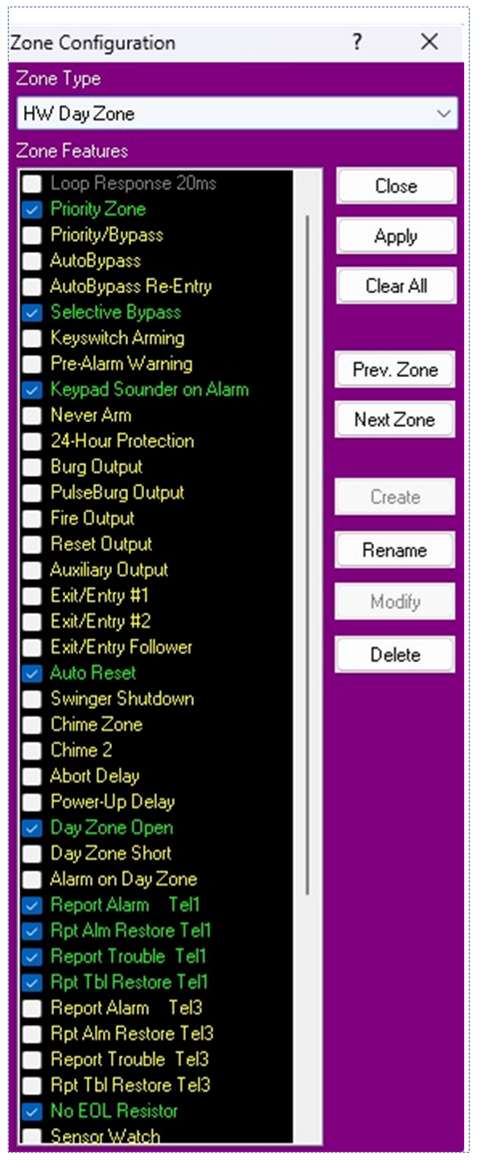
Connect the 2.2K resistor to the StarLink terminal 3 (PGM1), then connect a wire from the other leg of the resistor to an open zone on the control panel. Select the following features in the Zone Configuration screen (i.e., program as a Hard-Wired Day Zone; see image below):
Priority Zone, Selective Bypass, Keypad Sounder on Alarm, Auto Reset, Day Zone Open, No EOL Resistor, Adv. Code 24-Hour. Place the zone into an active Area. If this is a reporting system, enable Report Alarm, Report Alarm Restore, Report Trouble, and Report Trouble Restore on Telco 1.
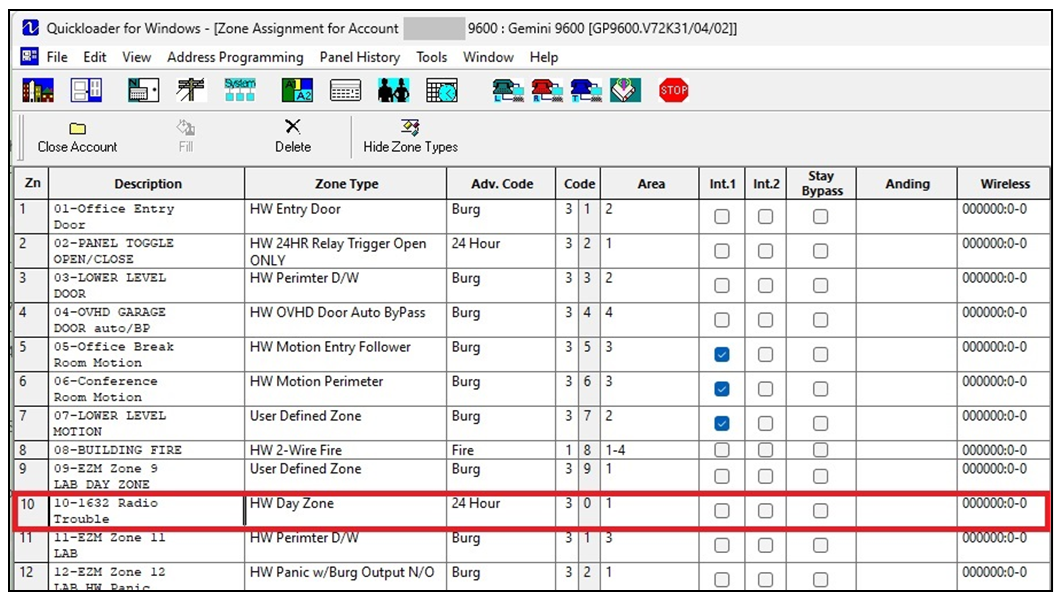
In the example shown in the bottom image, Zone 10 is set for monitoring the StarLink communicator troubles and reports to a central station.