
FAQs
What is the Abort Delay security alarm system feature?
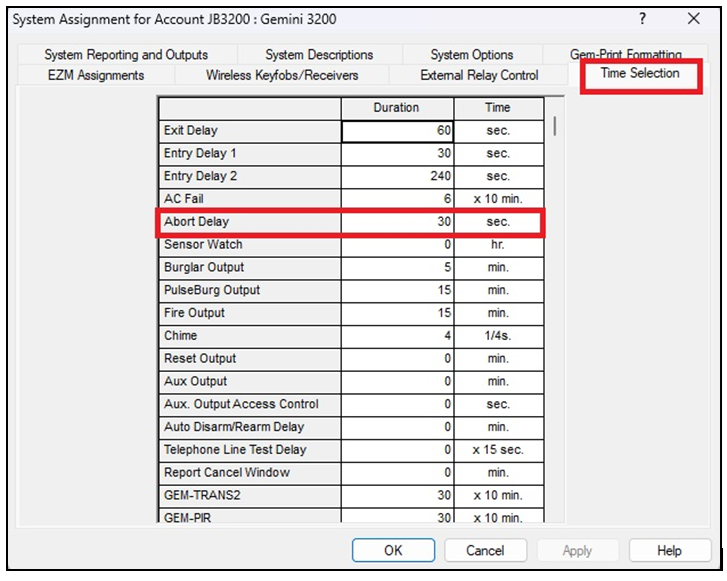
The Abort Delay feature delays the reporting of a zone-trip alarm to allow for cancellation before the alarm report is sent to the central station. For example, if a zone programmed for Abort Delay trips while the system is armed, the central station report will be delayed for the programed Abort Delay duration to allow for disarming. This delay only affects reporting; it does NOT affect any other outputs such as the burglary siren output. The duration is set in the Time Selection tab of the System Assignments screen.
Programming is simple using PCD-Windows Quickloader software.
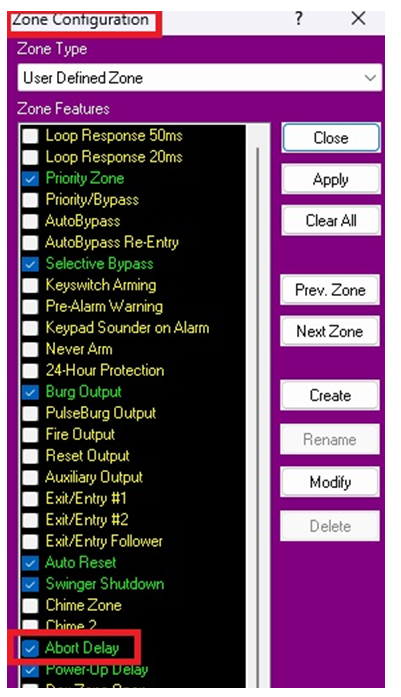
- Open the Zone Configuration screen (shown below) and add a check to Abort Delay for any/all zones that you wish to use this feature.
- In the System Assignments screen, Time Selection tab, enter the delay time (in seconds).
- Download these changes to the control panel and test the system.
Notes:
- If Abort Delay is selected for a 24-Hour Zone, the zone must be cleared before disarming the Area.
- SIA CP-01 requires a minimum of 15 seconds, a maximum of 45 seconds, and a default time of 30 seconds. In accordance with UL standards, the objective of the standard is to ensure that the combined Entry Delay time and Abort Delay time will not exceed one minute.